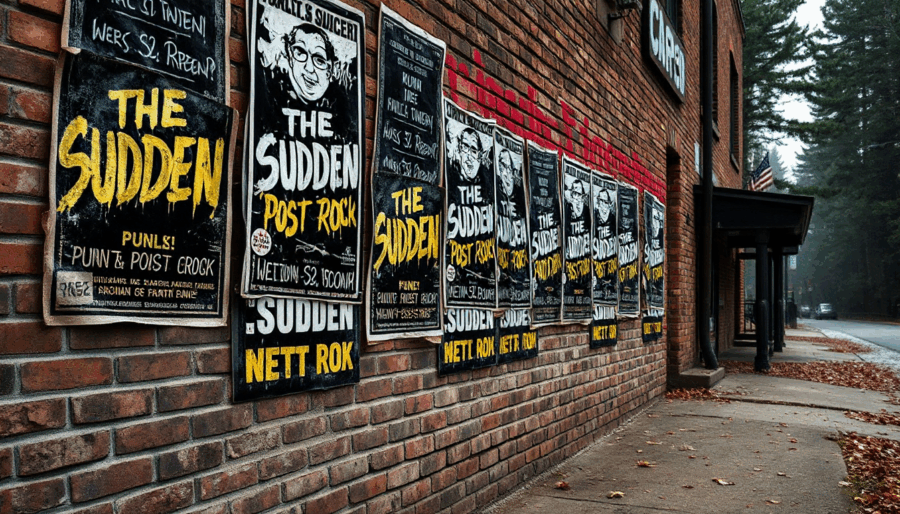
Designing a concert poster isn’t just about colors and typefaces; it’s about capturing a vibe, translating sound into vision, and pulling people into an experience before the first note even plays.
With Sogni, creators can channel those moods directly through prompting, building vivid visuals that echo the energy of any show, whether it’s a gritty Rock and Roll set, a family-friendly daytime festival, or a euphoric rave.
In this Tips & Tricks edition, we’ll break down how to craft distinct poster styles using just the right language, image tools, and layout guidance. From atmospheric lighting to focal elements, these examples will show how to turn your concert vision into a poster that hits just as hard as the music.
1. The Rock and Roll Poster, (The Sudden Band inspo).
This type of poster should scream power, rebellion, and impact. Think bold composition, dramatic shadows, and textures that feel loud. Our goal here is to match the visual intensity of a band that feels like a wall of sound, such as The Sudden, a band based in the Rocky Mountains known for their high-energy tracks, hard-driving guitars, and alternative post-punk style. Their visuals often feature surreal or gritty themes, from hermit crabs under cosmic skies to burning flames and ghostly textures, combining bold typography with strange, atmospheric imagery.
Prompt example:
“concert poster for a post-punk rock band called The Sudden, black-and-white forest backdrop with nature figures, surreal lighting effects, handwritten band name, bold sans-serif type, eerie natural textures, slight motion blur, layered smoke and shadows, blank area in center bottom for venue and date”

Prompt structure tips:
- Start with the genre and subject: concert poster for a post-punk band
- Set the scene: black-and-white forest
- Add mood: surreal lighting, eerie natural texture, motion blur
- Typography: handwritten logo, modern sans-serif
- Leave space: bottom center for details
Tools to use in Sogni:
- PaintOver to add custom tour name, date, or venue details
- Crop tool to refine composition for Instagram story vs flyer formats
2. The Community Festival Poster (The Picnic Style)
This style is friendly, colorful, and full of life. Ideal for family or community events, you want to communicate joy, openness, and belonging. Think open-air setting, smiling faces, picnic blankets, music notes, and lush greenery.
Prompt example:
“photographic concert poster for a community music festival called The Picnic, outdoor park scene under daylight, large inflatable astronaut installation as visual centerpiece, giant purple octopus tentacles in background, festive family environment, natural colors and cheerful expressions, text in center reading ‘The Picnic’ with red and white gingham tablecloth texture”

Prompt structure tips:
- Start with the event type: community music festival poster
- Set the scene: outdoor park, blue sky, trees, picnic
- Add elements: balloons, instruments, families
- Tone: colorful, vintage, cheerful
- Keep space: blank center for text
Tools to use in Sogni:
- Zoom out for composition
- Inpainting for cleanup and detail
PaintOver to refine text areas or apply texture

3. The EDM/Rave Poster (EDM Festival Style)
This is where you go all-in on color, abstraction, and movement. An EDM poster needs to feel like it vibrates. Think glowing waves, strobe lights, futuristic energy, and a club/rave mood.
Prompt example:
“ultra-detailed EDM festival poster, inspired by EDM music festivals, pulsing neon lights and laser beams, holographic soundwave patterns in the sky, futuristic cityscape at night, glowing crowd silhouettes dancing with hands in the air, immersive lighting effects, blank central space for lineup text, high energy, dreamlike and immersive style”

Prompt structure tips:
- Name the style: EDM or rave festival poster
- Build the vibe: neon, laser lights, abstract waves
- Set the tone: futuristic, high energy, vibrant colors
- Include action: crowd silhouettes, dancing
- Reserve space: center area for lineup
Tools to use in Sogni:
- Zoom out to create balanced spacing
- PaintOver for lineup, ticket info, or links

Each poster style has its own language and rhythm. Once you master how to speak through prompts and use Sogni’s tools for fine control, you’re no longer designing, you’re composing visual music.

