Tag: Sogni Studio

  • How to Build a Product Campaign with Sogni AI

    How to Build a Product Campaign with Sogni AI

    Whether you’re launching your own clothing brand, a handmade skincare line, or the next cult-favorite gadget, a good product campaign is more than just visuals, it’s about coherence, emotion, and storytelling. In a world saturated with digital ads, what cuts through is intention. With Sogni AI, creators no longer need a full production team to bring product ideas to life. You can visualize the entire narrative, packaging, moodshots, lifestyle setups, brand feel, directly from a well-structured prompt. In this Tips & Tricks guide, we’ll break down how to approach product storytelling from scratch: from defining the emotional core of your product to creating the visual assets you need for Instagram, e-commerce, or ad creative. We’ll show how to build full scenes around a product, not just render isolated images. 

    Because great campaigns don’t just show what something looks like, they make you feel why it matters.


    1. Fashion Accessories Editorial (Handbag Hero Shot)

    Accessories are often the emotional centerpiece of a fashion campaign. A handbag isn’t just a product, it’s a symbol of identity, function, and movement. With Sogni, you can generate high-impact visuals that echo the aesthetic of global design brands without needing models or studio access.


    Prompt example:
    “minimalist street fashion editorial photo, model in profile walking along textured concrete wall, holding designer handbag, inspired by Japanese urban design, neutral color palette with black and white tones, soft directional lighting, oversized coat and clean sneakers, calm and structured composition, space above for campaign text”

    Prompt structure tips:

    • Define scene and model presence: walking, profile, standing
    • Add styling: oversized coat, sneakers, bag as focus
    • Set the tone: neutral colors, concrete textures, calm light
    • Allow space for text: top or side margin

    Tools to use in Sogni:

    • PaintOver to overlay logo or campaign name
    • Crop for format variations (stories, portrait, landscape)
    • Zoom Out to add breathing space or background variation

    2. Apparel Product Shot (Stylized Fashion)

    Whether you’re launching a tee drop or building a full clothing brand, your campaign needs more than flat shots, you need mood, movement, and styling. You can generate fashion-forward visuals without models or wardrobe.

    Prompt example:
    “studio fashion photo of oversized graphic t-shirt on hanger, bold lighting with colored gels (red and purple), futuristic shadows on background wall, shirt features large design in center (blank space), editorial high contrast look, clean minimal set”

    Prompt structure tips:

    • Start with garment: graphic tee, hoodie, dress, etc.
    • Mention presentation: on hanger, folded, worn (silhouette only)
    • Add mood: bold lighting, shadows, abstract wall background
    • Text/design area: centered blank space for artwork or text

    Tools to use in Sogni:

    • PaintOver for design overlays
    • Creating a Solid Background: When generating your prompt, you can include a clean background color (e.g., “white seamless backdrop” or “solid beige background”) to prepare the image for direct use in product catalogs or websites.

    3. Skincare / Wellness Product (Soft, Clean, Real)

    Beauty and skincare campaigns thrive on clean aesthetics, soft natural light, and intimate detail. These campaigns benefit from photorealism and emotional warmth.

    Prompt example:
    “elegant skincare scene for luxury moisturizer jar, soft daylight from side, beige linen fabric as background, natural stone surface, dried flowers decor, glass jar with gold lid in center, minimalist branding, shallow depth of field”

    Prompt structure tips:

    • Name the product and material: glass jar, dropper bottle, metal tube
    • Mood: daylight, soft textures, shallow focus
    • Elements: linen, stone, dry flowers, shadows
    • Framing: center focus, space for logo

    Tools to use in Sogni:

    • Zoom Out to expand environment
    • Inpainting to tweak textures and edges
    • PaintOver to test packaging variations

    4. Tech Accessories (Futuristic, Lifestyle, Sleek)

    Tech campaigns benefit from contrast — either super clean, modern setups or dynamic lifestyle scenes. The goal: make the object feel like part of a cooler future.

    Prompt example:
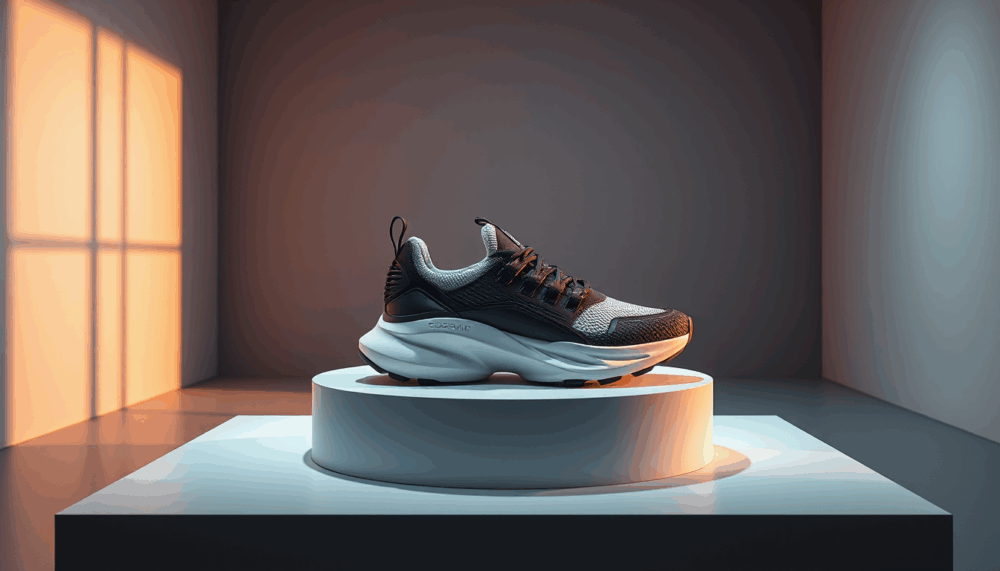
    “product photo of futuristic wireless earbuds on concrete block, dramatic top lighting, deep shadows, cool gray and cobalt palette, floating hologram-style UI above the earbuds, realistic texture detail, high-tech mood, blank space above for text”

    Prompt structure tips:

    • Focus on form: headphones, smartwatch, stylus…
    • Set the surface and background: metal, wood, dark studio, lifestyle
    • Add energy: holograms, glow, motion blur if needed
    • Leave editable space: above or side for branding

    Tools to use in Sogni:

    • PaintOver to add UI elements, price, or names
    • Zoom Out for layout
    • Crop for ad/hero shots

    You don’t need a warehouse, models, or production budget to build product stories. With the right prompts and tools, Sogni lets you prototype campaigns that look good enough to launch, and better yet, inspire.
  • How to Design a Concert Poster with AI Prompts

    How to Design a Concert Poster with AI Prompts

    Designing a concert poster isn’t just about colors and typefaces; it’s about capturing a vibe, translating sound into vision, and pulling people into an experience before the first note even plays.

    With Sogni, creators can channel those moods directly through prompting, building vivid visuals that echo the energy of any show, whether it’s a gritty Rock and Roll set, a family-friendly daytime festival, or a euphoric rave. 

    In this Tips & Tricks edition, we’ll break down how to craft distinct poster styles using just the right language, image tools, and layout guidance. From atmospheric lighting to focal elements, these examples will show how to turn your concert vision into a poster that hits just as hard as the music.

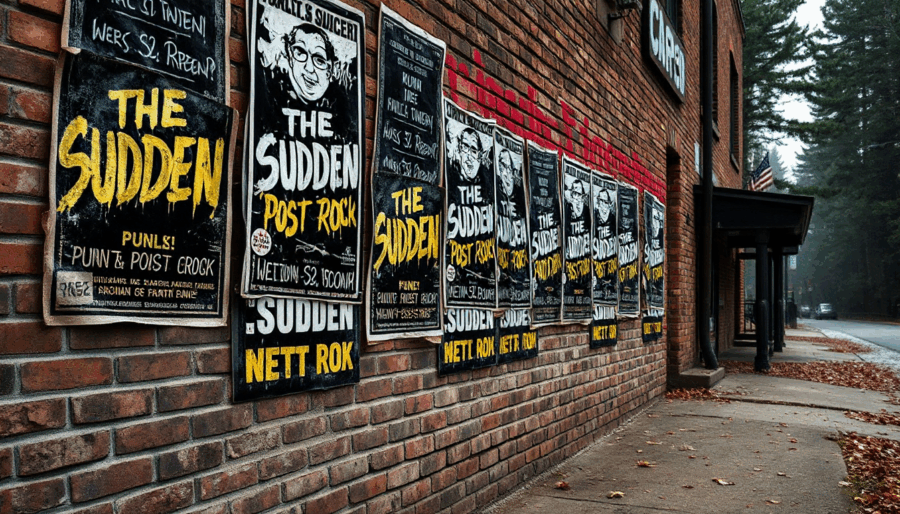
    1. The Rock and Roll Poster, (The Sudden Band inspo).

    This type of poster should scream power, rebellion, and impact. Think bold composition, dramatic shadows, and textures that feel loud. Our goal here is to match the visual intensity of a band that feels like a wall of sound, such as The Sudden, a band based in the Rocky Mountains known for their high-energy tracks, hard-driving guitars, and alternative post-punk style. Their visuals often feature surreal or gritty themes, from hermit crabs under cosmic skies to burning flames and ghostly textures, combining bold typography with strange, atmospheric imagery.

    Prompt example:


    “concert poster for a post-punk rock band called The Sudden, black-and-white forest backdrop with nature figures, surreal lighting effects, handwritten band name, bold sans-serif type, eerie natural textures, slight motion blur, layered smoke and shadows, blank area in center bottom for venue and date”


    Prompt structure tips:

    • Start with the genre and subject: concert poster for a post-punk band
    • Set the scene: black-and-white forest
    • Add mood: surreal lighting, eerie natural texture, motion blur
    • Typography: handwritten logo, modern sans-serif
    • Leave space: bottom center for details

    Tools to use in Sogni:

    • PaintOver to add custom tour name, date, or venue details
    • Crop tool to refine composition for Instagram story vs flyer formats

    2. The Community Festival Poster (The Picnic Style)

    This style is friendly, colorful, and full of life. Ideal for family or community events, you want to communicate joy, openness, and belonging. Think open-air setting, smiling faces, picnic blankets, music notes, and lush greenery.

    Prompt example:
    “photographic concert poster for a community music festival called The Picnic, outdoor park scene under daylight, large inflatable astronaut installation as visual centerpiece, giant purple octopus tentacles in background, festive family environment, natural colors and cheerful expressions, text in center reading ‘The Picnic’ with red and white gingham tablecloth texture”


    Prompt structure tips:

    • Start with the event type: community music festival poster
    • Set the scene: outdoor park, blue sky, trees, picnic
    • Add elements: balloons, instruments, families
    • Tone: colorful, vintage, cheerful
    • Keep space: blank center for text

    Tools to use in Sogni:

    • Zoom out for composition
    • Inpainting for cleanup and detail

    PaintOver to refine text areas or apply texture


    3. The EDM/Rave Poster (EDM Festival Style)

    This is where you go all-in on color, abstraction, and movement. An EDM poster needs to feel like it vibrates. Think glowing waves, strobe lights, futuristic energy, and a club/rave mood.

    Prompt example:
    “ultra-detailed EDM festival poster, inspired by EDM music festivals, pulsing neon lights and laser beams, holographic soundwave patterns in the sky, futuristic cityscape at night, glowing crowd silhouettes dancing with hands in the air, immersive lighting effects, blank central space for lineup text, high energy, dreamlike and immersive style”


    Prompt structure tips:

    • Name the style: EDM or rave festival poster
    • Build the vibe: neon, laser lights, abstract waves
    • Set the tone: futuristic, high energy, vibrant colors
    • Include action: crowd silhouettes, dancing
    • Reserve space: center area for lineup

    Tools to use in Sogni:

    • Zoom out to create balanced spacing
    • PaintOver for lineup, ticket info, or links


    Each poster style has its own language and rhythm. Once you master how to speak through prompts and use Sogni’s tools for fine control, you’re no longer designing, you’re composing visual music.

  • How to Prompt Perfect Graffiti Text with Sogni AI

    How to Prompt Perfect Graffiti Text with Sogni AI

    Graffiti isn’t just text spray painted on a surface.t’s texture, rebellion, and rhythm. Whether it’s sprayed across a crumbling brick wall or layered over a freight train in motion, the visual language of graffiti has its own codes and attitude. And when prompting with AI, you’re not just asking for “words”,you’re recreating an entire subculture on the wall of a virtual city.

    Here are  5 tips on how to get it right with Sogni AI.

    1. Start with the vibe, not the word

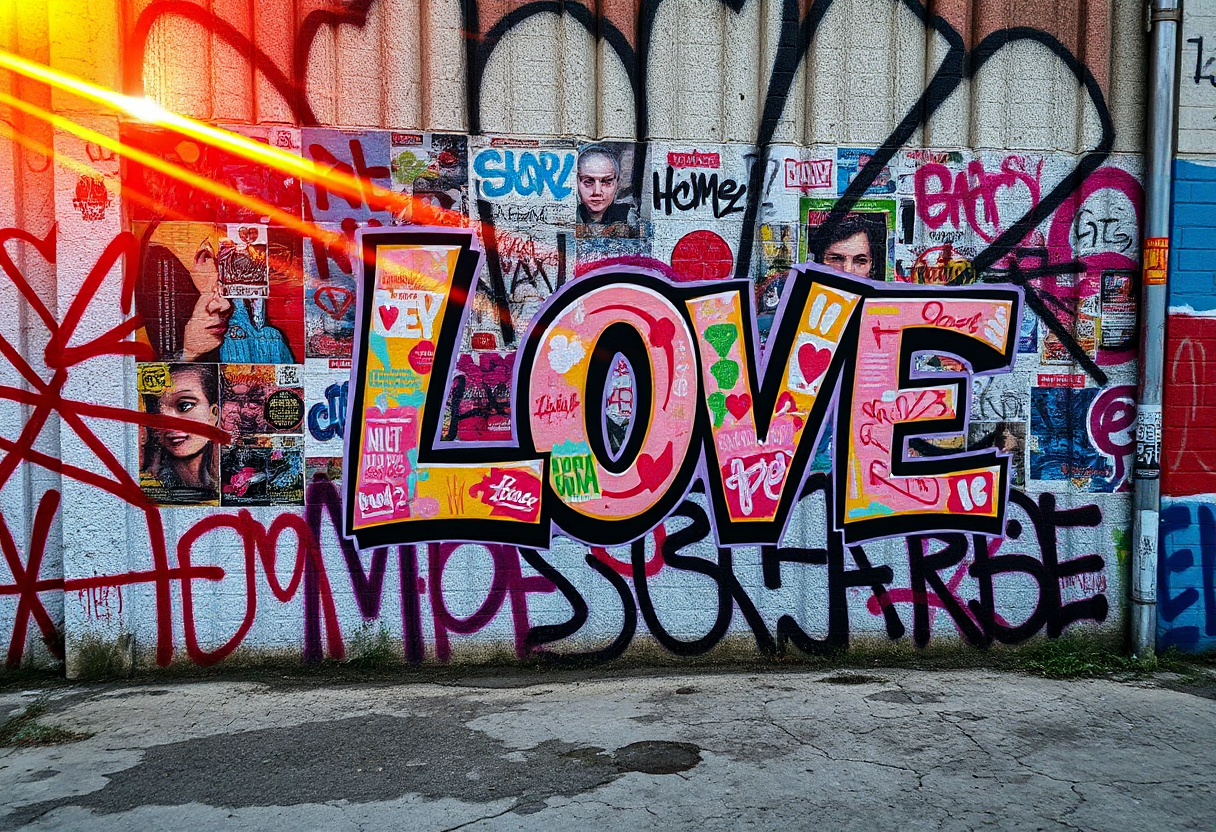
    Instead of prompting literally for a message (“graffiti that says ‘LOVE’”), begin by describing the scene, the energy, or the aesthetic.

    Try:

    “Urban wall covered in vibrant street art and layered graffitti, cracked concrete surface.”

    This gives the model context to build a convincing graffiti scene where words naturally emerge from the environment. If you just write “text,” AI might return illegible scribbles or typographic chaos. Remember: graffiti is style-first, then message.

    2. Use layout cues, not literal commands

    Want a full mural? A chaotic wall of tags? A single word in bold, stylized form? Examples:

    “One central graffiti tag in bold black spray paint on a clean concrete wall.”
    “Graffiti mural with colorful layered tags and stencil elements.”

    This helps guide placement and composition without getting lost in the syntax.

    3. Trigger style with key graffiti terms

    Sogni’s Flux model responds well to culture-coded terms. Try incorporating references like:

    • “spray paint”
    • “street art”
    • “urban mural”
    • “drips and stencil effects”
    • “Berlin-style graffiti”
    • “throw-up” or “wildstyle” (for more complex lettering)

    This language helps the model focus on visual grammar instead of defaulting to “text = typography.”

    4. Add realism through materials and lighting

    Make it feel like part of the world. Texture and light are essential in graffiti.

    Prompt ideas:

    “cracked concrete surface, deep sunset lighting with golden highlights, realistic 3D spray paint textures, stencil shapes,”

    You’re creating a believable environment, not just “words on wall.”

    5. Use Symmetry and Focal Cues to Anchor the Message

    When aiming for readable or semi-readable graffiti, help the model by anchoring the text visually. Describe the placement, scale, and balance rather than relying on the AI to guess. Use terms that signal composition and intent.

    Try:

    “Graffiti wall with a central focal point, large stylized letters in the middle, symmetrical layout, framed by layered street tags and faded posters.”

    This approach nudges the AI toward a cleaner arrangement where your intended text area stands out, even if the lettering isn’t crystal clear, the design reads as intentional. You’re not fighting the model, you’re steering it gently.


    Pro Tip: Use Flux

    Among Sogni’s models, Flux delivers particularly strong results for graffiti prompts. That’s thanks to its training on high-contrast urban environments, texture-heavy scenes, and stylized visual cues. If you’re trying graffiti, Flux should be your go-to.


    Want more prompt recipes like this one? Follow along at SogniNews.com or check out our artist community on Reddit and Instagram.
    And don’t forget—Freedom to Create, Power to Earn.

  • Direct by Design: How PaintOver Bridges Control and Imagination

    Direct by Design: How PaintOver Bridges Control and Imagination

    In the flow of creation, there’s a moment when you want to say, “Yes, but more like this.” That’s exactly where PaintOver comes in—now available in Sogni AI.

    PaintOver in Sogni Pocket for iPhone and iPad gives artists direct, tactile control over their guide images. Want to add sunglasses to a character? Mask out a distracting shape? Paint in a jacket or adjust just the light on the face? You can do all of that—without writing a single prompt.

    This feature is designed for creators who think visually and want tools that bend to their style, not the other way around. PaintOver lets you touch your image directly, then lets the model reimagine your intention with just a tap of Imagine.


    What You Can Do with PaintOver:

    • Emphasize a focal point
    • Erase unwanted elements
    • Adjust tone or lighting locally
    • Add text, symbols, or graphic flourishes
    • Modify your character (add glasses, hats, etc.)
    • Blend hand-painted and generative processes

    How It Works:

    1. Choose a Guide Image to use as your starting point.
    2. Tap PaintOver to enter painting mode.
    3. Use the brush tool to paint directly on the image. It doesn’t need to be perfect.
    4. Enable OverPaint (bottom-left toggle) to let the model interpret your additions.
    5. Tap Imagine and watch your new version come to life.

    💡 Tip: Lower the strength slider below 50% for more imaginative reinterpretations with just enough control.


    For Iterative Workflows:

    Turn on Auto-Refresh to evolve your image step-by-step. Each result becomes your new canvas. It’s like having an infinite sketchbook that learns with you.


    Why It Matters:

    PaintOver isn’t just another editing tool. It’s a bridge between human intuition and AI amplification. It’s about collaboration, not automation. And it keeps the artist at the center—where they belong.

    We All Create

  • Keep Creating: Sogni Studio & Sogni Pocket Now Seamlessly Recovers Your Work

    Keep Creating: Sogni Studio & Sogni Pocket Now Seamlessly Recovers Your Work

    Now, Sogni Studio and Sogni Pocket automatically reconnect and resume your sessions whenever life interrupts. Whether you step away, answer a call, lose connection, or switch apps, your work remains safely in your hands.

    This update strengthens our commitment to empowering human creativity without technical barriers. Especially for iOS users, where multitasking used to interrupt image generation, Sogni now safeguards your in-progress creations, letting you reconnect and continue seamlessly.

    Because creativity isn’t just about inspiration—it’s about continuity.
    We believe in tools that adapt to the creator, not the other way around.

    Learn more about how Sogni protects creative flow in our full ecosystem at docs.sogni.ai.

    Sogni – Fueling Creativity with Decentralized Power.


  • How to Create a Storyboard with Sogni AI: Visual Planning Made Easy

    How to Create a Storyboard with Sogni AI: Visual Planning Made Easy

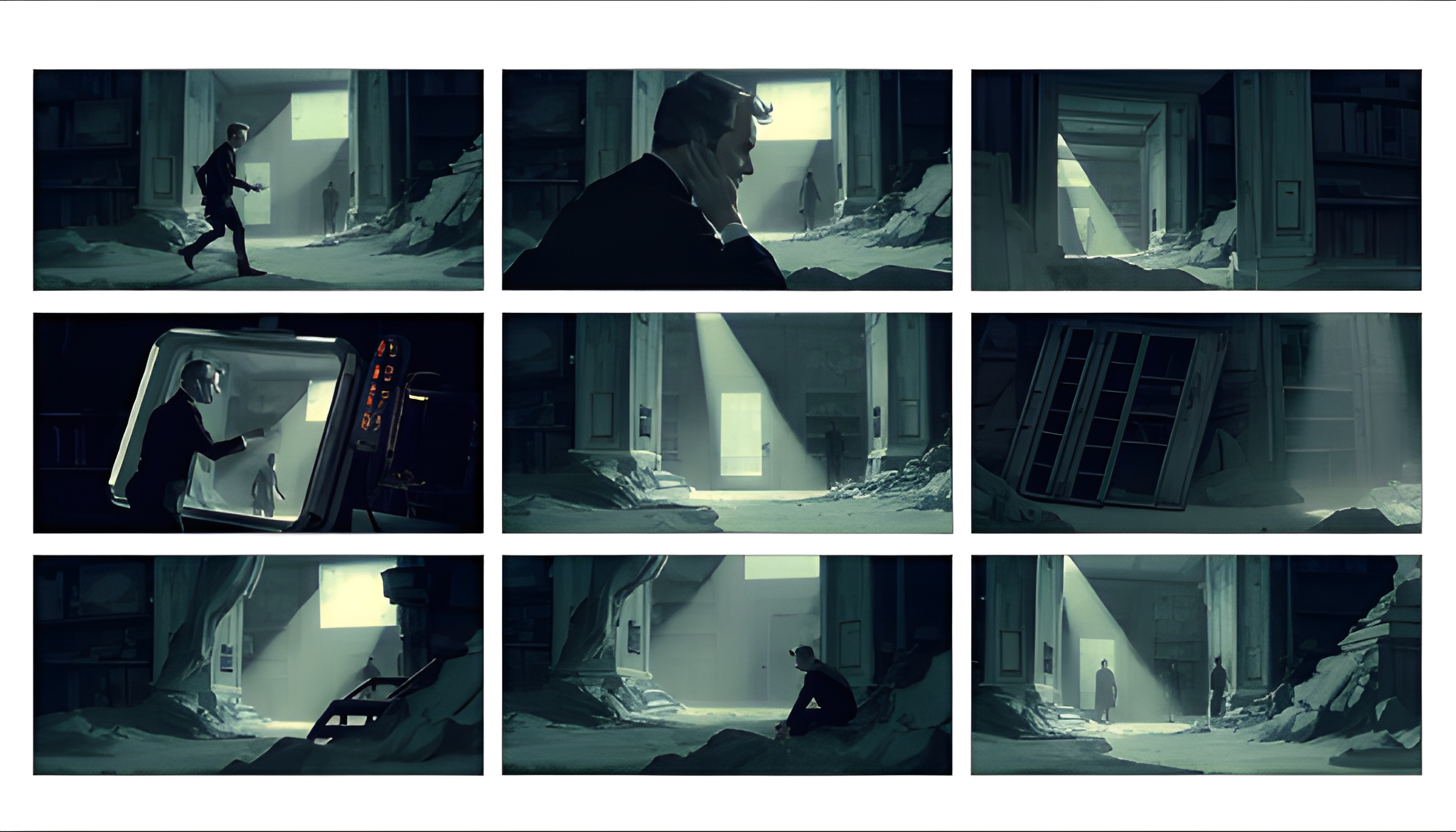
    Creating a storyboard is one of the most efficient ways to plan a story before committing time and resources to production. With Sogni Studio, creatives can quickly visualize sequences, test aesthetics, and align narrative structure—supporting a fully fleshed-out ideation process that can easily adapt as inspiration evolves.

    Using AI for storyboarding removes traditional bottlenecks, letting you focus on creative decisions. Sogni Studio enables fast, flexible visual planning through intuitive tools and real-time rendering.

    Storyboards help break down a story into individual scenes. They provide:

    • Visual alignment between team members
    • A clear timeline of events or camera shots
    • A chance to catch pacing or narrative issues early

    Using Sogni for Storyboarding Sogni enables you to generate frame-by-frame concepts through text or sketch prompts. Here’s a simple workflow:

    1. Define the Narrative
      Start by outlining your scene structure. Identify the number of shots or moments you need to visualize (e.g., opening shot, character dialogue, action moment, closing scene).
    2. Prompt Each Scene with Sogni’s Prompt Enhancer
      Use Sogni Studio’s tools to generate an image for each moment. Include key visual elements in your prompt (e.g., “A character in a foggy forest, wide shot, dawn lighting”). Use the Prompt Enhancer to fine-tune your descriptions and get more consistent results. You can also adjust framing using Guide Image or Sketch Inputs to maintain visual coherence across scenes.
    3. Organize and Sequence
      Group the generated images chronologically. You can export them and annotate transitions, dialogue, or movement. 
    4. Iterate and Align
      Share the storyboard with your team and adjust prompts as needed to refine character style, composition, or setting. Sogni’s batch generation and SwipeFlow features make the process faster. On the Mac app, you can also export a .sognifile—making it easy to share your work or keep a versioned backup.

    Fast, Flexible, and Always Within Reach

    Sogni lets you quickly bring visual ideas to life from any device. Whether you’re testing a scene or refining a sequence, you can iterate without friction and move your creative process forward—no complex setup required.

    Try it Out
    Start framing your story ideas in Sogni Studio and turn abstract scripts into tangible visuals.Learn more or try it at sogni.ai

    #WeAllCreate


  • Unlocking the Art of Prompt Engineering: Creating Stunning AI Photos with Sogni AI

    Unlocking the Art of Prompt Engineering: Creating Stunning AI Photos with Sogni AI

    By Badoiu Valentin @SirDevil

    In the exciting realm of AI-generated art, prompt engineering is the secret ingredient that transforms creative ideas into breathtaking visuals. If you’ve been exploring Sogni.ai and are eager to improve your results, you’ve come to the right place! Today, we’ll dive into the art of crafting prompts using the concept of “collagraph” and the power of adding objects.

    What is Prompt Engineering?

    Simply put, prompt engineering is the practice of carefully designing text instructions (prompts) to guide AI tools in creating the desired output. It’s like giving a creative brief to an artist: the clearer and more specific your request, the better the outcome. With tools like Sogni.ai, your prompts become the paintbrush to an AI artist!

    Why “Collagraph”?

    The term “collagraph” originates from the art world, referring to prints created using textured materials glued to a surface. When used in an AI photo-generation context, the word “collagraph” can evoke a blend of texture, layering, and artistic depth—adding a unique flair to your digital creations. Using such artistic language in your prompts unlocks new levels of creativity.

    The Power of Adding Objects

    Adding specific objects to your prompts can help anchor your visuals and enhance storytelling. Think of objects as the characters in your artwork. By incorporating them into your “collagraph” prompts, you can create compositions that feel grounded, lively, and deeply imaginative.

    Step-by-Step: Crafting the Perfect Prompt

    1. Start with “Collagraph”: Begin your prompt with this word to set the tone. For example: “Collagraph of…”

    2. Choose a Central Theme: Pick the subject or focus of your artwork. Is it an enchanted forest, a bustling city, or a serene oceanscape?

    3. Add Objects: Enhance your theme by specifying objects. For instance:  

       – “Collagraph of a whimsical forest with glowing mushrooms, fireflies, and a wooden bridge.”  

         – “Collagraph of an ancient marketplace featuring a golden fruit stand, clay pottery, and colorful fabric stalls.”  

       – “Collagraph of a tranquil beach with seashells, a driftwood sculpture, and softly crashing waves.” 

    4. Specify Style or Details: Mention the artistic style, lighting, or mood to guide Sogni.ai further. For example, “Collagraph of an ancient castle with ivy-covered walls, illuminated by golden sunset rays.”

    5. Experiment and Iterate: Sometimes, the first try may not hit the mark. Tweak your prompt, test new combinations, and let the AI surprise you.

    Tips for Success

    – Use descriptive language: Adjectives like “vibrant,” “dreamlike,” or “ethereal” can influence the style of your image.

    – Be specific with objects: “A blue ceramic teapot” works better than “a teapot.”

    – Imagine the story behind the art: What emotion or narrative do you want your image to convey?

    Final Thoughts

    Mastering prompt engineering is a journey of discovery and creativity. With practice, you’ll learn to craft prompts that bring your wildest imaginations to life. So, fire up Sogni.ai, experiment with “collagraph,” and don’t be afraid to add objects to your prompts. The possibilities are as limitless as your creativity!

    Let’s Stay Connected!

    Want more tips, tricks, and creative insights? Let’s keep the inspiration flowing! Follow me on social media:

    – **Facebook**: (Facebook)

    – **X/Twitter**: (X)

    – **TikTok**: (TikTok)

    – **YouTube**: (YouTube)

    Don’t forget to hit that follow button and join me on this creative adventure!   

  • Turn Your Idle Compute into Earned Tokens with Sogni Studio Pro

    Turn Your Idle Compute into Earned Tokens with Sogni Studio Pro

    Your Power. Your Rewards.

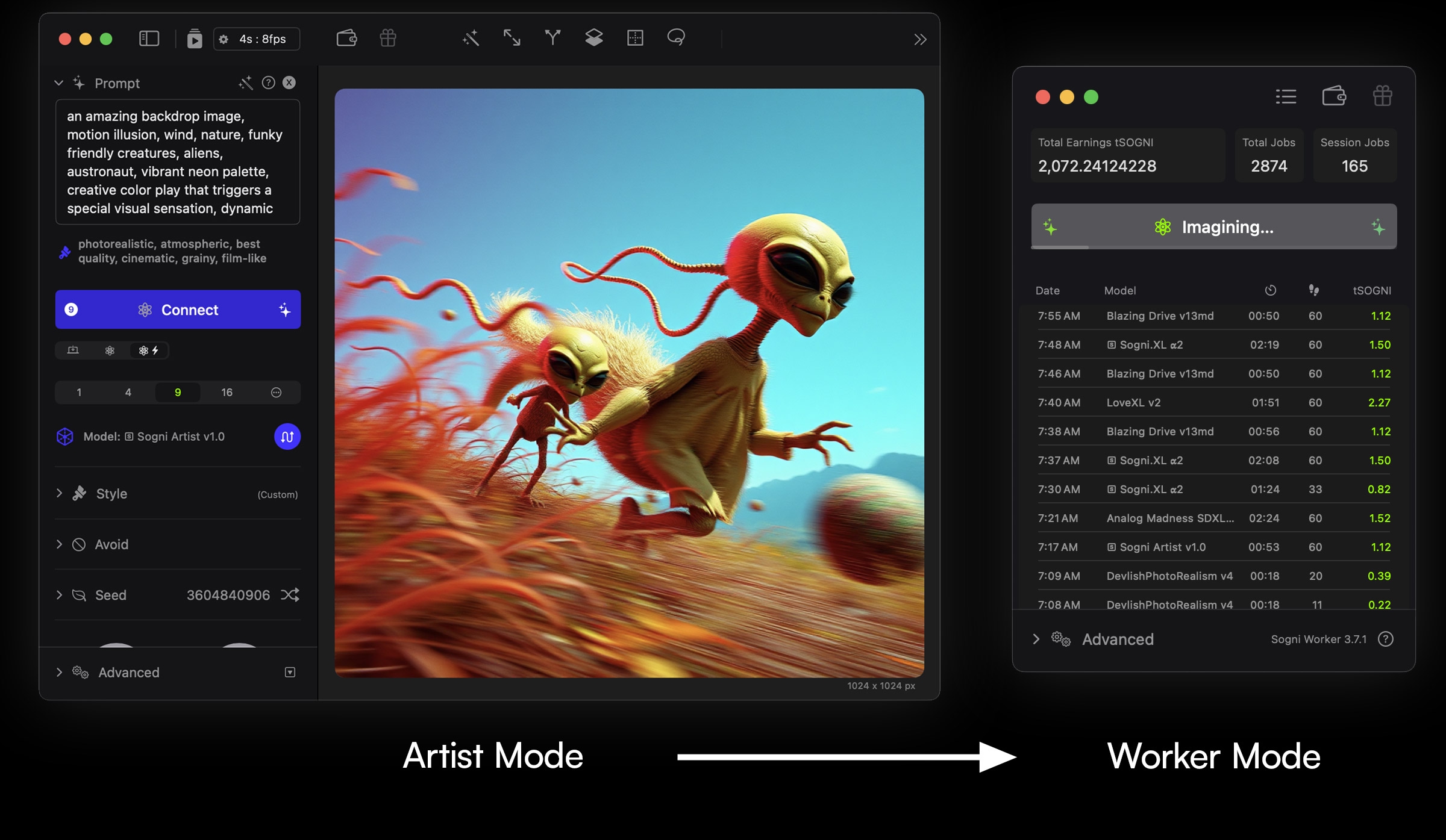
    In an era where AI-powered creativity is rapidly evolving, Sogni is leading the charge with a decentralized, community-driven approach. And now, with Worker Mode in Sogni Studio Pro, you can put your idle computing power to work, contributing to the Supernet while earning token rewards.

    The future of AI should be collaborative, rewarding, and open, and Worker Mode is a step toward making that a reality. Whether you’re a digital artist, a creator, or simply someone with unused GPU power, Sogni ensures that your hardware is actively participating in the creative revolution.


    Why Worker Mode?

    For too long, centralized AI platforms have monetized computing power without giving back to those who fuel them. Sogni flips the script, ensuring that anyone who contributes power to the network is rewarded while keeping full control of their system.

    With Worker Mode, your Mac will generate AI-powered images for the community, and in return, you’ll earn SOGNI tokens. This model creates an equitable and self-sustaining AI ecosystem where artists, creators, and contributors all benefit.

    🔹 One-Click to Start Earning

    Sogni has made onboarding into Worker Mode effortless. Here’s how simple it is:

    1. Navigate to Supernet in Sogni Studio Pro.
    2. Click on Enter Worker Mode & Earn from the top menu.
    3. Watch as Sogni switches to a mini-player mode, instantly starting job processing based on the models installed on your Mac.

    No complex setups, no unnecessary configurations—just one click, and you’re earning.


    Designed for Privacy, Security, and Efficiency

    One of the biggest concerns with decentralized compute-sharing networks is privacy. Many fear that running external jobs could lead to vulnerabilities. That’s why Worker Mode in Sogni Studio Pro was designed from the ground up with privacy and efficiency at its core.

    🔒 Non-Intrusive & Secure: Worker Mode runs in the background, ensuring that your Mac’s performance remains unaffected while you continue working on other tasks. Unlike traditional compute-sharing networks, Sogni does not access personal files, nor does it interfere with your active projects.

    ⚡ Optimized for Performance: Even while running Worker Mode, Sogni intelligently manages system resources, ensuring that users don’t experience slowdowns or overheating issues.

    With this seamless integration, you can earn without compromising your workflow or security.


    Climb the Leaderboards & Maximize Rewards

    Sogni’s decentralized economy rewards consistent contributors, and Worker Mode users have the opportunity to climb the Relaxed Worker Leaderboard.

    🏆 How it Works: The more processing jobs you complete, the higher your rank on the leaderboard. The top-performing contributors will receive a major SOGNI token airdrop shortly after the TGE (Token Generation Event).

    For those looking to maximize their potential earnings, leaderboard participation is an excellent way to increase visibility and rewards.


    What Can You Do with Your Earnings?

    Sogni believes in giving its users full financial flexibility over their rewards. Unlike traditional platforms where earned credits are locked into proprietary systems, SOGNI tokens allow for true ownership.

    💰 Use Your Tokens Your Way:

    • Generate more AI images in Artist Mode.
    • Withdraw tokens to your external wallet.
    • Trade and participate in Sogni’s expanding AI economy.

    The more you contribute, the more control you gain over how you use your rewards.


    Exclusive to Sogni Studio Pro

    Worker Mode is exclusively available in Sogni Studio Pro, the most advanced version of Sogni’s AI-powered creative platform. Designed for professional artists, creators, and AI enthusiasts, Sogni Studio Pro brings cutting-edge tools while keeping everything decentralized.

    For those using Nvidia GPUs, Sogni also offers additional Fast Worker options that can be run through GPU rental services—an excellent alternative for those without access to Apple’s ecosystem.


    The Future of Decentralized AI is Here

    Sogni’s Worker Mode isn’t just about earning—it’s about reshaping the creative economy. In a world where AI computing is often monopolized by centralized entities, Sogni gives the power back to its users.

    By participating in Worker Mode, you’re not just earning—you’re contributing to the future of decentralized AI-powered creativity.

    🔥 Fueling Creativity with Decentralized Power.


  • Sogni Studio Tips: Better Composition, Better Results

    Sogni Studio Tips: Better Composition, Better Results

    Composition is key in any visual creation. It shapes the mood, balance, and message of your artwork. Whether you’re sketching a concept or refining a detailed design, having control over framing, perspective, and positioning makes all the difference.

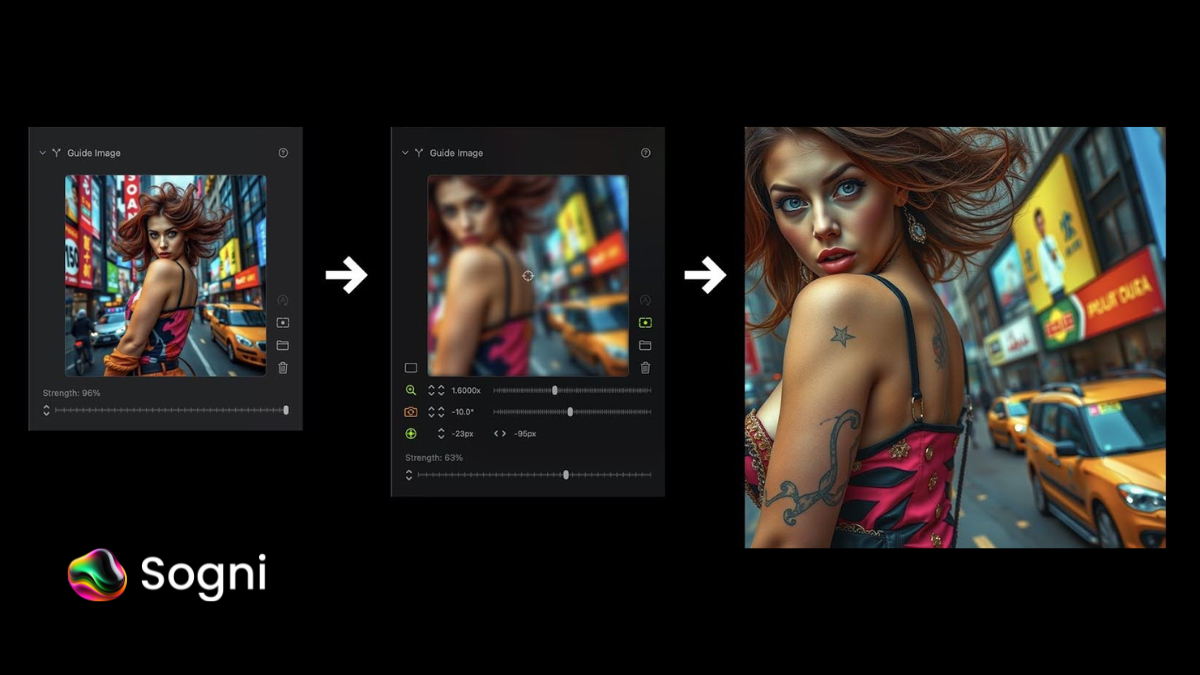
    Sogni Studio introduces camera settings that give you just that—control. With zoom, pan, and rotation now available for Guide Image and ControlNet, you can frame your work exactly how you imagined it. This update empowers creators to go beyond random outputs and truly shape their vision.

    Why Composition Tools Matter

    Before these tools, creating consistent and balanced images often meant trial and error. Now, you can:

    • Adjust how your visual references are interpreted
    • Keep proportions and poses consistent
    • Refine framing across a full series of visuals

    Whether you’re developing concept art, product visuals, or personal projects, this means less time re-generating and more time perfecting.

    What You Can Do Now

    ✔️ Match your framing and style across multiple creations
    ✔️ Refine visual perspective with precision
    ✔️ Work faster with less guesswork
    ✔️ Keep full control of your creative direction

    Sogni Studio isn’t just about automation—it’s about enabling your artistic choices to lead the process.


    🔗 Ready to create with more control? Explore it at Sogni.ai